Minecraft has always been a sandbox for boundless creativity, but with the 1.20 update, player self-expression reached an entirely new dimension. Gone are the days when powerful armor meant sacrificing personal style; now, Community Creations & Sharing Armor Trims are inspiring an explosion of new player designs, turning functional gear into a true fashion statement. This isn't just about protection anymore; it's about crafting an identity, showcasing your flair, and connecting with fellow Minecrafters through shared aesthetic adventures.
At a Glance: Armor Trims Unveiled
- New Customization: Armor Trims are unique cosmetic patterns applied to armor using smithing templates.
- Visual Flair Only: They add no defensive or offensive bonuses – pure style!
- Vast Options: 18 distinct trim patterns and 10 color materials mean over a billion unique armor set combinations when paired with leather armor's dye options.
- Crafting Essential: Applied at a Smithing Table using a template, an armor piece, and a coloring material.
- One-Time Trim: Once an armor piece is trimmed, it cannot be trimmed again.
- Treasure Hunt: Templates are found in various structures across all three dimensions, encouraging exploration.
- Rarest of the Rare: The Silence Armor Trim, found in Ancient Cities, is the most coveted.
Armor Trims: Your New Canvas for Personal Expression
Before 1.20, your armor choices were largely dictated by utility. Diamond for defense, Netherite for ultimate power, gold for enchantments—but always with a fixed aesthetic. The true joy of Minecraft, however, lies in personalization. From custom builds to unique skins, players constantly seek ways to make their mark. Armor Trims finally bridge this gap, allowing you to imbue your gear with a distinct personality, reflecting your playstyle, allegiance, or simply your impeccable taste.
Imagine a group of adventurers, each member boasting a unique, themed armor set. A desert explorer with sand-colored trim, a netherite-clad warrior gleaming with golden accents, a stealth operative in dark hues with a subtle, intricate pattern. This is the new reality of Minecraft, where every player can become a designer, and every armor set tells a story.
Unlocking the Artistry: How Armor Trims Work
At its heart, the armor trimming system is elegant in its simplicity but profound in its potential. It introduces a new class of items: Smithing Templates. These aren't just for upgrading to Netherite anymore; they're the keys to transforming your look.
The Power of the Smithing Table
Your faithful Smithing Table, typically used for basic repairs or Netherite upgrades, now becomes your personal design studio. This humble block, crafted from two iron ingots and four wooden planks, is where all the magic happens. Think of it as your fashion workbench, ready to turn raw materials into stunning wearable art.
A Palette of Possibilities: Colors and Combinations
The sheer variety of combinations is where armor trimming truly shines. You have:
- 18 Different Armor Trims: Each with a unique pattern, many inspired by the structures they're found in.
- 10 Unique Coloring Materials: Amethyst, Copper, Diamond, Emerald, Gold, Iron, Lapis, Netherite, Quartz, and Redstone. Each material casts a distinct hue onto the trim, allowing for incredible customization.
The magic truly happens when you consider the base armor material itself. While all armor types can be trimmed, leather armor holds a special place. Because leather armor can be dyed any color, combining its nearly infinite dye options with the 18 trims and 10 colors creates a staggering over a billion unique armor sets. This is a testament to the depth of customization available, ensuring that your unique vision can truly come to life. Even using the same material for the trim as the base armor (e.g., a Netherite trim on Netherite armor) offers a subtle yet distinct darker shade, adding another layer of nuanced design.
The Great Hunt: Where to Find Every Template
The templates aren't handed out freely; finding them is an adventure in itself, encouraging players to explore the farthest reaches of all three dimensions. Each template is a rare treasure, rewarding exploration and determination. Here's a guide to where your next fashion statement might be hiding:
- Ancient City: Venture into the Deep Dark for a chance at the ultra-rare Silence Armor Trim (a mere 1-1.2% chance, making it the rarest and most sought-after) and the formidable Ward Armor Trim. Be prepared to face the Warden!
- Bastion Remnant: Brave the perilous Nether fortresses of Piglins to uncover the Snout Armor Trim.
- Desert Pyramid: Delve into the sandy depths of the desert to find the Dune Armor Trim, perfect for sun-drenched adventurers.
- End City: Ascend the towering spires of the End dimension to claim the ethereal Spire Armor Trim.
- Jungle Temple: Navigate the lush, trap-filled confines of the jungle for the wild and untamed Wild Armor Trim.
- Nether Fortress: Explore the fiery corridors of the Nether Fortress to acquire the Rib Armor Trim.
- Ocean Monument: Conquer an Elder Guardian within the depths of an Ocean Monument to earn the majestic Tide Armor Trim.
- Pillager Outpost: Storm a Pillager Outpost to secure the vigilant Sentry Armor Trim.
- Shipwreck: Dive into sunken shipwrecks dotting the ocean floor for the nautical Coast Armor Trim.
- Stronghold: Uncover the hidden Eye Armor Trim within the ancient Strongholds.
- Trail Chambers: These new underground structures introduced alongside 1.21's trial chambers hold two templates: the Bolt Armor Trim (5.4% chance) and the more common Flow Armor Trim (22.5% chance).
- Trail Ruins: Excavate the mysterious Trail Ruins for a collection of unique templates: Host Armor Trim, Raiser Armor Trim, Shaper Armor Trim, and Wayfinder Armor Trim.
- Woodland Mansion: Brave the dangers of the vast Woodland Mansion to find the spooky Vex Armor Trim.
The thrill of the hunt for these templates adds another layer of gameplay, turning every chest you find into a potential jackpot for your next iconic look.
Crafting Your Signature Look: A Step-by-Step Guide
Once you have your desired template, armor piece, and coloring material, applying an armor trim is straightforward:
- Craft a Smithing Table: If you don't already have one, combine two iron ingots with four wooden planks.
- Open the Smithing Table: Right-click the block to access its interface.
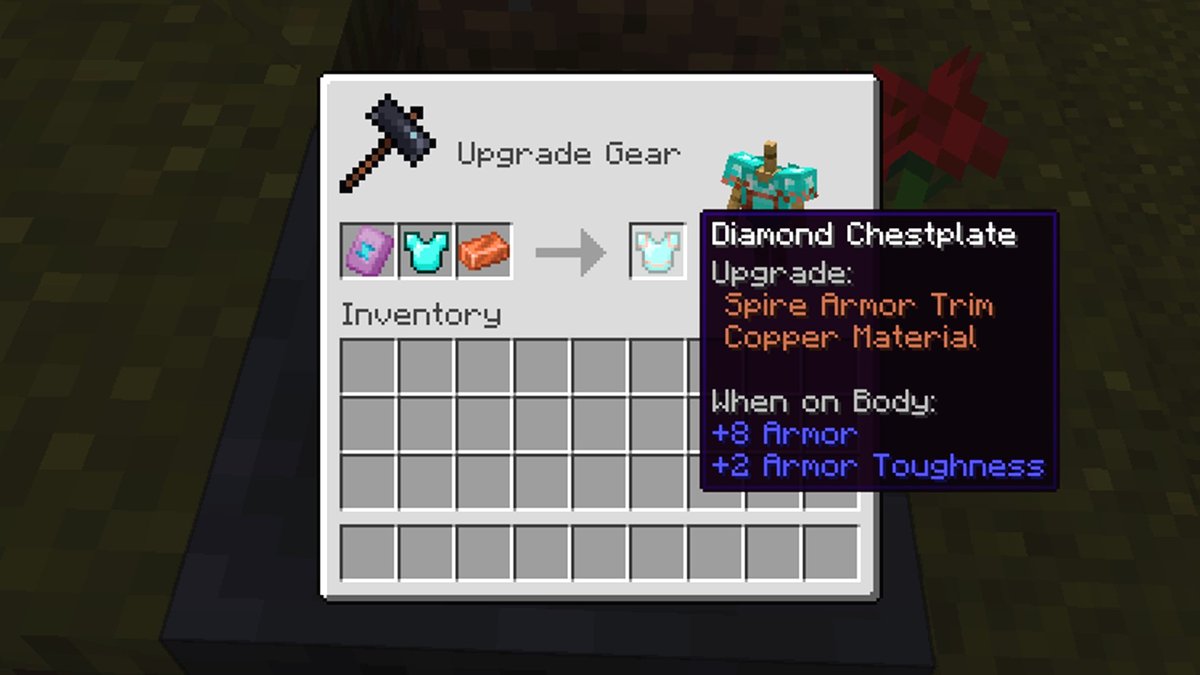
- Place the Armor Trim Template: Insert the specific Armor Trim smithing template you want to use into the leftmost slot.
- Place the Armor Piece: Put the armor piece (helmet, chestplate, leggings, or boots) you wish to customize into the middle slot.
- Place the Coloring Material: Add your chosen coloring material (e.g., Diamond, Gold, Lapis) into the rightmost slot.
As soon as all three items are in place, a preview of your trimmed armor will appear in the output slot, allowing you to confirm your design before committing. Remember, once an armor piece is trimmed, it cannot be trimmed again, so choose wisely!
Beyond the Basics: Maximizing Your Aesthetic Potential
The true depth of armor trimming emerges when you start combining its features with existing customization options and thinking strategically about your designs.
Mastering Leather Armor Dyes
Leather armor remains the most versatile canvas for color. By first dyeing your leather armor and then applying a trim, you unlock an unparalleled spectrum of possibilities.
- Java Edition: Dye leather armor using a crafting table, placing one leather armor piece and one dye in the grid.
- Bedrock Edition: Use a cauldron filled with water and dye, then interact with the cauldron while holding your leather armor.
Experiment with base colors that complement or contrast your chosen trim material. A deep red leather chestplate with gold trim, or a stark white set with amethyst accents, are just a few examples. If you're encountering issues, double-check that you're using actual leather armor and the correct method for your game edition. (Note for Java Creative Mode: cauldrons won't work for dyeing; use a crafting table or switch to Survival).
Strategic Trim Collecting: Prioritizing the Rarest
Given the sheer number of templates and the effort required to find them, collecting becomes an art. While all trims offer unique aesthetics, some are inherently more prestigious due to their rarity. The Silence Armor Trim from Ancient Cities, for instance, is a badge of honor for those brave enough to face the Warden.
Consider what style you're aiming for. Do you want to project ancient power (Silence, Ward), nomadic exploration (Dune, Wild), or a mysterious aura (Spire, Vex)? Planning your desired look can guide your exploration efforts, making the hunt more focused and rewarding. You might even find it helpful to visualize different combinations before you commit; a tool like a Minecraft armor trim generator can be invaluable for previewing looks and planning your next big aesthetic project.
Combining Trims with Builds and Biomes
Your armor isn't just an isolated piece of gear; it's an extension of your character and, often, your base or preferred biome.
- Role-Playing: Design armor sets for specific roles in an RPG server—a guard, a wizard, an assassin.
- Base Theming: Match your armor's aesthetic to your base. A player living in a lush forest base might favor the Wild trim with copper accents, while a nether-dweller could sport the Rib trim with redstone.
- Seasonal/Event Wear: Create special outfits for in-game holidays or community events.
The possibilities are endless, allowing your personal style to seamlessly integrate with your entire Minecraft experience.
The Heart of Minecraft: Sharing Your Creations
The "Community Creations & Sharing Armor Trims" aspect isn't just part of the title; it's fundamental to how Minecraft players engage with new features. Once you've painstakingly collected templates, chosen your materials, and crafted the perfect ensemble, the natural next step is to show it off!
Showcasing Your Style: Screenshots, Videos, & Social Media
Minecraft communities thrive on shared inspiration. Players are already flooding platforms like Reddit, Twitter, TikTok, and YouTube with stunning screenshots and videos of their trimmed armor sets. This isn't just about showing off; it's about igniting new ideas and fostering a collaborative design environment.
- High-Quality Screenshots: Capture your armor in flattering light and dynamic poses.
- Showcase Videos: Create short clips demonstrating your armor from all angles, perhaps even showing the crafting process.
- Detailed Descriptions: Share the story behind your design choices—which templates you used, why you chose specific colors, and the adventure you undertook to acquire them.
These shared creations form a vibrant gallery of player ingenuity, pushing the boundaries of what's possible and sparking trends across the Minecraft world.
Community Challenges & Contests
The sheer variety of trims naturally lends itself to community-driven activities. Expect to see:
- Design Challenges: "Create an armor set fit for a king," "Design the ultimate stealth gear," or "Show us your biome-specific outfit."
- Scavenger Hunts: Community members challenging each other to find specific, rare trim templates.
- Voting & Awards: Players voting on the most innovative, aesthetically pleasing, or rarest armor designs.
These events not only encourage participation but also foster a sense of camaraderie and friendly competition, solidifying the social fabric of the Minecraft community around this new feature.
Inspiring Others: The Ripple Effect of Design
Every unique armor trim shared online acts as a catalyst. A player sees a combination they love and is inspired to go hunt for that specific template. A content creator makes a video showcasing "10 Epic Armor Trim Combos," and suddenly thousands of players are trying out new designs. This ripple effect of inspiration is what makes Minecraft's community so dynamic and creative. It transforms a simple cosmetic update into a powerful engine for collective imagination and shared joy.
Common Questions on Armor Trims
Curious about some specifics? Here are quick answers to frequently asked questions about armor trims.
What is the rarest armor trim?
The Silence Armor Trim is considered the rarest and largest, found in Ancient Cities within the Deep Dark biome. Its low spawn chance (1-1.2%) and the danger of the Warden make it a true prize for any collector.
Are armor trims available on Bedrock Edition?
Yes, armor trimming functionality was available in the Minecraft Preview app for Bedrock Edition before the official 1.20 release, and is now fully integrated.
Can I trim any armor type? Which is the "weakest" armor?
You can trim all armor types: Leather, Gold, Chain, Iron, Diamond, and Netherite. In terms of protective power, Leather armor provides the least protection, followed by Gold, Chain, Iron, Diamond, and then Netherite as the strongest. Armor trims are purely cosmetic and do not affect these stats.
How do I dye leather armor?
In Java Edition, combine one leather armor piece and one dye in a crafting table. In Bedrock Edition, fill a cauldron with water and dye, then apply the armor to the cauldron. Cauldrons do not work for dyeing in Creative Mode in Java Edition.
Your Next Adventure: Diving into Trim Design
The introduction of Armor Trims in Minecraft 1.20 is more than just a cosmetic update; it's a profound enhancement to player identity, creativity, and community engagement. No longer are you confined to generic looks; your armor can now truly reflect the epic tales you weave in the blocky world.
So, gather your tools, chart your course, and embark on the ultimate fashion quest. Whether you're spelunking into Ancient Cities for the elusive Silence trim or experimenting with vibrant dye combinations on your leather gear, the journey of discovering and sharing your unique style has just begun. Get out there, design your masterpiece, and inspire the next wave of creators in the ever-evolving world of Minecraft.